
If you're building or managing a WordPress site, you've likely encountered Elementor—it's one of the most popular page builders out there. But recently, Elementor introduced "Elementor One," leaving many users, including myself, scratching their heads. Is it a rebranding of the classic Elementor plugin? A completely new product? Or just an upsell? As someone who's been using the standard Elementor plugin for years, I dove into the details to clarify the differences. In this article, we'll break it down step by step, so you can decide what's best for your site without the confusion.
What is the Elementor Plugin and Why It's Still a Go-To Choice
The Elementor plugin is the foundational WordPress tool that revolutionized site building with its drag-and-drop interface. Available in a free version and a Pro upgrade, it lets you create pixel-perfect pages without coding. Key features include widgets for elements like buttons, forms, and galleries; theme building for headers and footers; and integrations with WooCommerce for eCommerce sites. The free tier handles basic designs well, while Pro adds advanced tools like custom CSS, popups, and dynamic content.
For many users, including small business owners or hobbyists, the plugin alone is sufficient. It's lightweight, flexible, and doesn't lock you into a credit system or bundled services you might not need. If your workflow is simple—design a site, optimize manually, and host elsewhere—the plugin keeps things straightforward and cost-effective, starting at $49/year for Pro. Evidence from user feedback shows that sticking with the plugin avoids unnecessary complexity, especially if you're not scaling multiple sites.
Introducing Elementor One: The All-in-One Subscription Model
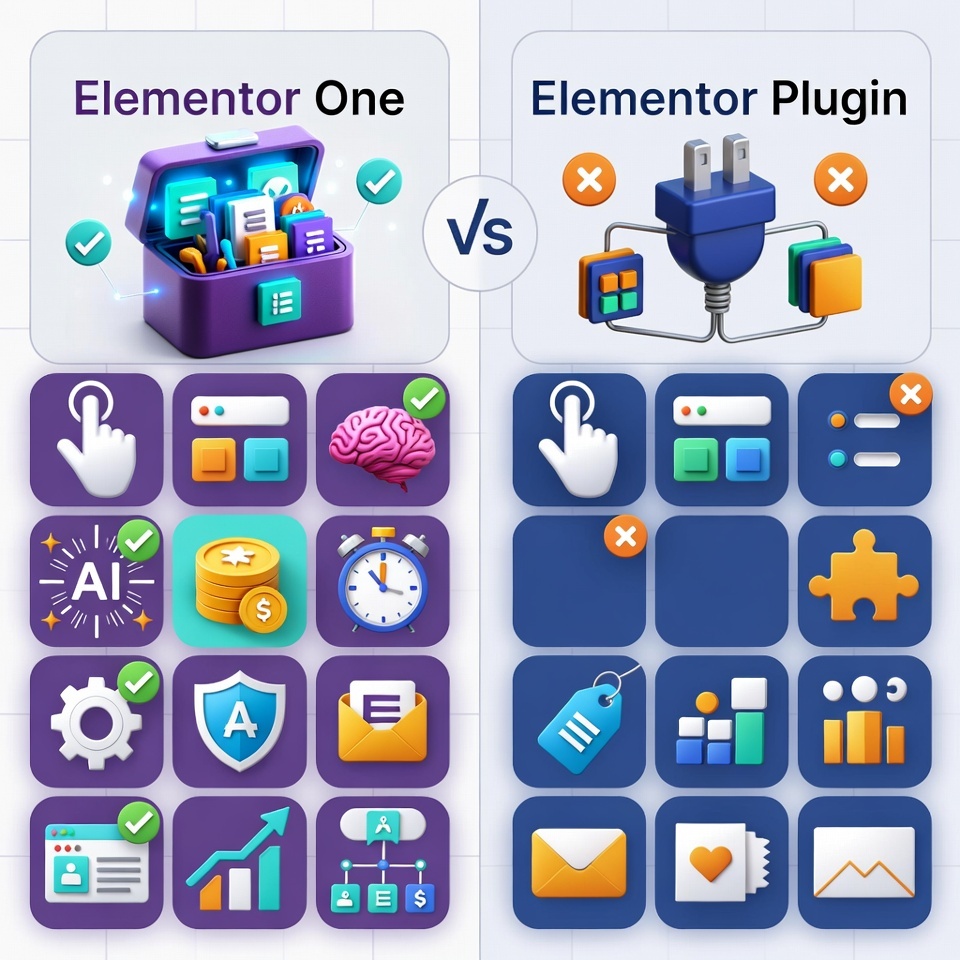
Elementor One is Elementor's push toward a unified platform, bundling the core plugin features with additional tools under one subscription. Launched recently, it includes what they now call "Editor Pro" (essentially the Pro plugin) plus a shared credit system for extras like AI-generated content, image optimization, email deliverability, and accessibility fixes. Credits reset monthly—25,000 for the basic One plan—and can be used across these features, adapting to your needs without separate add-ons.
This isn't just for beginners; it's geared toward freelancers and agencies managing multiple sites, offering a single dashboard for everything from design to performance management. However, some users report it feels like a "money grab" with buggy rollouts and confusing naming, suggesting it's more of an evolution than a revolution. If you're already deep into the plugin ecosystem, switching might add overhead without immediate benefits.
Key Differences: Features, Pricing, and Workflow
At first glance, Elementor One might seem like a rebranded plugin, but the differences lie in scope and structure:
- Core Building Tools: Both offer drag-and-drop editing, widgets, and theme building. The plugin's Pro version matches Editor Pro in One, so no loss there.
- Bundled Extras: One adds credit-based access to AI (for copy, images, code), optimizations (images, accessibility), and management tools (priority support, collaborative notes). The plugin requires third-party plugins or manual work for these.
- Pricing and Credits: Plugin Pro is ala carte ($49–$999/year based on sites). One starts similarly but uses credits (e.g., 10 credits per AI action), which don't roll over—potentially limiting heavy users unless you upgrade. It's often cheaper than buying add-ons separately, but if you underuse credits, you're paying for unused potential.
- Workflow: Plugin is plugin-only; install and go. One integrates into a dashboard for multi-site management, but this can feel overwhelming if you're not agency-scale.
- Support and Scalability: One offers priority support (including WhatsApp) and agency plans for unlimited sites, while the plugin sticks to standard ticketing.
User reviews highlight that while One streamlines for pros, it complicates things for solo users who prefer the plugin's simplicity.
Is Elementor One Just a Rebranding? The Reality Check
No, it's not a simple rebrand—it's a new offering that expands on the plugin. Elementor restructured their lineup: the plugin remains (free/Pro), but One wraps it with credits and tools to compete with all-in-one platforms like Wix or Squarespace. That said, the core editor hasn't changed much; the "new" feel comes from bundling. If you're happy with the plugin, there's strong evidence to stick with it—many users report no need for the extras, avoiding credit limits and potential bugs in the rollout. However, for growing needs, One could save time and money long-term.
How to Decide: Plugin vs. One for Your Specific Needs
Assess your setup: If you are using the plugin for a single site with occasional designs—stick with it to avoid overcomplicating. Evidence from community feedback shows the plugin's reliability and lower entry cost make it ideal for basics. But if you handle client sites, need AI boosts, or want bundled optimizations, test One—start with their money-back guarantee.
Consider your budget, site count, and feature usage. Run a quick audit: Do you often optimize images or generate AI content? If yes, One's credits shine. If not, the plugin's flexibility (pair with free tools) keeps you agile without lock-in.
Ready to explore? Check their plans directly elementor.com/pricing to see what fits.